
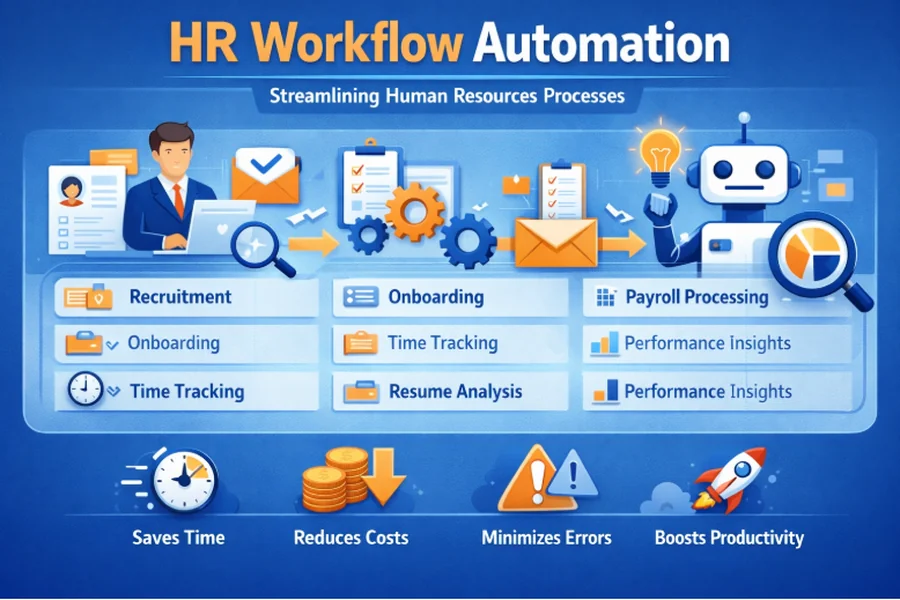
HR departments are under constant pressure to do more with less in today’s business environment. From onboarding new hires to managing time‑off requests and performance reviews, HR teams often find themselves buried in repetitive, manual tasks. Intelligent HR process automation is emerging as a game‑changer, allowing organizations to streamline these activities, reduce errors, and free up HR professionals to focus on strategic initiatives that truly move the needle.
Platforms like Bitrix24 illustrate how powerful a unified workspace can be when HR workflow automation is embedded directly into day‑to‑day operations. By automating routine HR tasks such as leave approvals, document signing, and internal communications, companies can significantly cut delays, minimize bottlenecks, and create a smoother experience for both employees and managers.
What Is HR Workflow Automation?
Modern HR process automation refers to the use of software tools and rules to digitize and streamline repetitive, rule‑based HR activities. Instead of relying on long email chains, spreadsheets, and paper forms, organizations configure digital workflows that route tasks, collect approvals, and trigger notifications automatically.
Typical processes that benefit from automated HR workflows include employee onboarding and offboarding, leave and time‑off requests, performance reviews, document signing, policy acknowledgments, and internal approvals such as expenses or equipment requests.
When implemented correctly, these automated people‑management flows run in the background, ensuring that nothing falls through the cracks while reducing the administrative burden on HR specialists and line managers.
Why HR Workflow Automation Matters
1. Time savings and reduced manual work
HR teams spend a significant portion of their time on administrative tasks that add little strategic value. Automating routine HR cycles – such as leave requests, approvals, and document signing – means fewer hours spent chasing signatures, sending reminders, or updating spreadsheets.
For example, when an employee submits a vacation request through an automated system, the request is routed instantly to the manager, who receives a notification and can approve or reject it with a single click. The system then updates calendars, records, and notifications without manual intervention, which noticeably accelerates the entire process.
2. Fewer errors and better compliance
Manual processes are inherently error‑prone. A missed approval, an incorrectly filled form, or an outdated policy version can lead to compliance issues, payroll mistakes, or even legal risks. Digital HR process workflows reduce these risks by enforcing standardized procedures and maintaining an audit trail of every action.
In platforms like Bitrix24, HR workflows can be configured so that every request follows the same path, with clear roles, deadlines, and required documents. This traceability makes it easier to demonstrate compliance during audits and to identify where bottlenecks or deviations from policy occur.
3. Improved employee experience
Employees expect fast, transparent, and user‑friendly processes from their workplace tools. When they have to wait days for a simple leave approval or struggle to find the right form, frustration quickly builds. Automated HR operations create a smoother, more predictable experience by providing clear status updates, self‑service options, and instant notifications.
For instance, an employee can submit a request, track its progress in real time, and receive automated updates when it’s approved or rejected. This transparency builds trust, reduces the number of “where is my request?” messages HR has to handle, and increases overall engagement.
4. Better data visibility and decision‑making
Automated HR pipelines generate structured data that can be analyzed to identify trends, inefficiencies, and opportunities for improvement. Instead of digging through scattered emails and legacy spreadsheets, HR leaders can access dashboards that show approval times, request volumes, and workload distribution across departments.
This data‑driven insight helps organizations optimize policies – for example, adjusting leave‑approval rules, balancing workloads, or rethinking performance review schedules – and allocate resources more effectively.
How HR Workflow Automation Works in Practice
1. Employee onboarding and offboarding
Onboarding is often the first impression a new hire has of a company’s culture and efficiency. A well‑designed people‑operations automation system can orchestrate the entire onboarding journey, from the moment an offer is accepted to the employee’s first weeks in the role.
Common automated steps include sending welcome emails and onboarding checklists, assigning tasks to HR, IT, and the hiring manager (such as equipment setup or access permissions), collecting signed documents and policy acknowledgments, and scheduling orientation sessions and training events.
Similarly, offboarding workflows can ensure that access is revoked on time, equipment is returned, and exit interviews are scheduled automatically, reducing security risks and administrative overhead.
2. Leave and time‑off management
Managing vacation, sick leave, and other time‑off requests manually is a major pain point for many organizations. Digitized leave‑management workflows can allow employees to submit requests through a self‑service portal, route these requests to the appropriate approver based on role or team, check remaining balances and policy rules automatically, and update calendars while notifying relevant stakeholders.
This not only speeds up approvals but also helps prevent scheduling conflicts and ensures that coverage is maintained across teams without constant back‑and‑forth communication.
3. Approvals and document signing
Many internal processes require multiple approvals – whether it’s an expense report, a purchase request, a job grade change, or training budgets. Automated HR approval chains can define routes based on roles, departments, or amounts, send automatic reminders when approvals are overdue, and trigger follow‑up actions once a request is approved, such as creating an invoice or updating records.
Document signing can also be automated using digital signatures and integrated workflows, so employees and managers don’t have to print, scan, or email forms back and forth. This leads to faster cycle times and a more sustainable, paper‑free office.
4. Performance management and feedback
Performance reviews and feedback cycles are often delayed because they rely on manual coordination and scattered documents. With automated performance workflows, organizations can schedule review cycles in advance, automatically assign review tasks to managers and employees, collect feedback from multiple sources, and generate reports and summaries for HR and leadership.
This ensures that performance conversations happen on time, that the criteria used are consistent, and that feedback is documented centrally instead of being buried in email threads or personal notes.
The Role of Integrated Platforms
One of the key advantages of modern HR process automation tools is that they are part of broader, integrated workspaces rather than isolated apps. Bitrix24, for example, combines HR management, task management, communication, and automation in a single ecosystem.
This integration means that employee profiles, company structure, and access permissions are centrally managed; workloads, KPIs, and time tracking can be tied directly to HR‑related workflows; and communication tools such as messenger, video calls, and announcements are available within the same environment. Users do not need to constantly switch between different systems.
Bitrix24 also includes automation rules and triggers, Robotic Process Automation (RPA), and Smart Process Automation (SPA), which allow organizations to automate complex, multi‑step processes without writing code and to adapt these processes as their business changes.
For example, a company can set up a workflow where a new hire is added to the system, an onboarding checklist is created automatically, tasks are assigned to HR, IT, and the manager, and notifications are sent to the new employee with links to documents and training materials. End‑to‑end automation not only saves time but also ensures consistency and a professional experience for every new hire.
AI in HR Workflow Automation
Beyond basic rules and triggers, AI is starting to play a significant role in optimizing HR operations. Tools like AI assistants can help HR teams draft policies, announcements, and reports; summarize meeting notes and extract action items; and generate ideas for engagement initiatives or internal communications.
For example, HR can use AI to create standardized templates for performance review questions, generate summaries of employee feedback from surveys, or draft personalized messages for recognition and onboarding. This combination of automation and AI allows HR teams to scale their efforts without sacrificing quality or personalization, especially in growing organizations.
Getting Started with HR Workflow Automation
Implementing HR process automation doesn’t have to be an all‑or‑nothing project. Many organizations start by automating a few high‑impact, repetitive processes and then expand over time. A practical approach usually includes four steps: mapping processes, defining rules, choosing a platform, and running pilots.
First, document the key HR workflows your team handles regularly, such as onboarding and offboarding, leave and time‑off requests, approvals, and performance reviews. Identify where delays, errors, or bottlenecks occur – these are prime candidates for automation.
Next, define clear rules and roles for each process: who initiates the request, who needs to approve it, what conditions must be met, and what should happen after approval or rejection. The clearer the logic, the easier it will be to configure it in your automation tool.
Then, choose a platform that offers built‑in HR automation features, integrates with your existing systems (email, calendar, payroll, collaboration tools), and supports no‑code or low‑code configuration so HR can manage workflows without heavy IT involvement.
Finally, start with a pilot process – such as leave requests or onboarding – and test it with a small group of employees and managers. Gather feedback, monitor performance metrics like approval times and user satisfaction, and refine the workflow as needed. Once the pilot proves successful, expand automation to other HR processes and gradually build a more comprehensive, automated HR operations model.
FAQ: HR Workflow Automation
What is HR workflow automation?
Smarter HR process automation is the use of software tools to automate repetitive, rule‑based HR processes such as leave requests, approvals, onboarding, and performance reviews. It reduces manual work, minimizes errors, and improves the overall employee experience.
What processes can be automated?
Common processes include employee onboarding and offboarding, leave and time‑off requests, performance reviews and feedback cycles, document signing and policy acknowledgments, and internal approvals related to expenses, equipment, or role changes.
How does it improve compliance?
By enforcing standardized procedures, maintaining a complete audit trail, and ensuring that every request follows a predefined path, digital HR workflows reduce the risk of errors and make it easier to demonstrate compliance during internal or external audits.
Can non‑technical HR teams set up automated workflows?
Yes. Many modern platforms offer no‑code or low‑code automation tools that allow HR professionals to configure processes using visual builders, templates, and predefined rules without writing a single line of code.
What role does AI play here?
AI can assist HR teams by drafting policies and announcements, summarizing notes from meetings or interviews, generating reports, and suggesting improvements to internal processes. When combined with automated HR pipelines, AI helps scale HR efforts while maintaining quality and personalization.
Is HR workflow automation only for large companies?
No. Smaller organizations also benefit from automation because it reduces administrative overhead and allows lean HR teams to handle more tasks with fewer resources. Larger companies use it mainly to standardize processes across multiple locations and departments.