
The quick answer
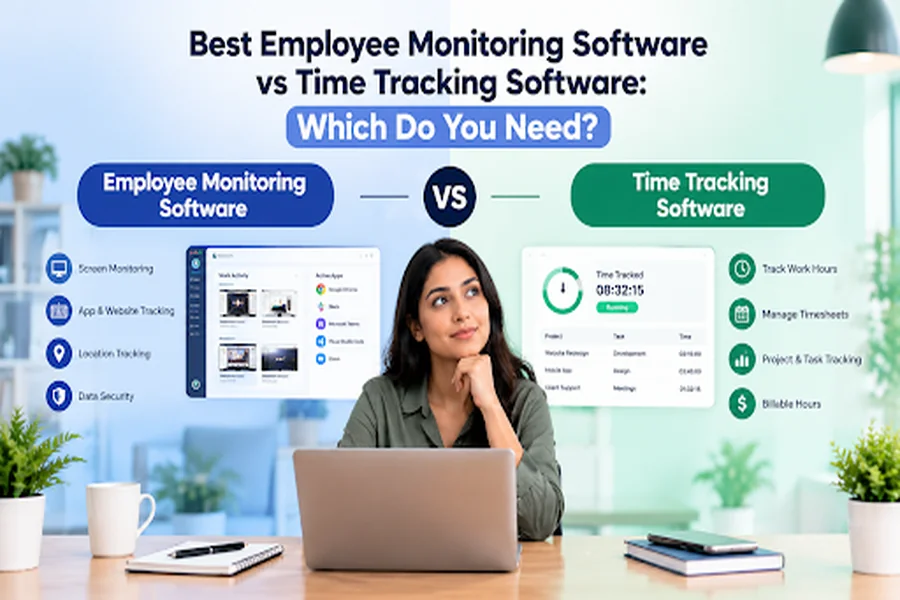
Time tracking software shows you where your team’s hours go. Employee monitoring software shows you how people use work devices during those hours.
So which one do you need? It depends on the question you want answered each week.
- Pick time tracking if you bill clients by the hour or need clean timesheets for payroll.
- Pick employee monitoring if you need to protect company data on work devices.
- Pick a tool that does both if you run remote teams and need to show clients proof of work.
Most service teams need time tracking first. Monitoring comes second, and it works best with clear rules your team agrees to.
Below, you’ll find the best employee monitoring software and time tracking tools for 2026. We ranked 15 tools using real ratings from top review sites. We checked every rating ourselves on 26 October 2026.
Disclosure: The Workstatus team wrote this article. Workstatus appears on this list. We ranked it on the same rules as every other tool, and you’ll find its weak spots listed too.
What the numbers tell you
Hours matter. Trust matters just as much. These numbers show why you need both.
- Only 20% of employees worldwide feel engaged at work. Low engagement cost the global economy an estimated $10 trillion in lost productivity. (Gallup, State of the Global Workplace 2026)
- Most remote-capable US employees now work away from the office. 52% work hybrid. Another 26% work fully remote. (Gallup, May 2026)
- Workers face an interruption every 2 minutes. Meetings and messages break up the day. (Microsoft Work Trend Index 2025)
- 40% of employees got no explanation of the data their employer collects. Gartner found that informed employees trust their employer more. (Gartner, 2022)
- The time tracking software market should almost triple. It grows from $6.1 billion in 2025 to $17.39 billion by 2033. (Grand View Research)
- The employee monitoring market grows too. It moves from $648.8 million in 2025 to $1.78 billion by 2034. (Fortune Business Insights)
Now look at how monitoring feels to the people on the other side of the screen.
Source: APA 2023 Work in America Survey, 2,515 US adults
Monitoring without context adds stress. So the best setup tracks work openly and shares the data with your team. (APA, 2023 Work in America Survey)
Time tracking vs employee monitoring: what’s the difference?
What is time tracking software?
Time tracking software records how long your team works on each task. It also links those hours to a client or project.
Example: A designer spends 3 hours on Client A’s logo. The tool logs those 3 hours to Client A. You bill the right amount.
It answers one question: Where did our hours go?
What is employee monitoring software?
Employee monitoring software records activity on work devices. It can track apps and websites. Some tools also take screenshots.
User activity monitoring software (UAM) is a stricter type. It watches how people use company systems to spot security risks.
Example: Someone copies a customer file to a USB drive. A UAM tool flags it. Your IT team checks it before data leaks.
It answers a different question: How do people use our devices and data?
Side by side
| What you need | Time tracking | Employee monitoring |
|---|---|---|
| Main goal | Know where hours go | Know how devices get used |
| Best for | Billing clients and running payroll | Data safety and compliance |
| What it records | Hours per task or project | Apps and websites, sometimes screenshots |
| Effect on trust | Low risk when people log openly | Higher risk without clear rules |
| Typical buyer | Agencies and IT service firms | IT and security teams |
Rule of thumb: If your problem costs you money, start with time tracking. If your problem puts data at risk, start with monitoring.
The 15 best employee monitoring and time tracking tools at a glance
Here is the full list in one view. Details for each tool follow below.
| S.No. | Tool | Type | Best for | Highest rating | Starting price (per user/month) |
|---|---|---|---|---|---|
| 1 | Insightful | Both | Remote and hybrid teams | 4.8/5 on Capterra | $8 (annual) |
| 2 | Hubstaff | Both | Remote teams with payroll needs | 9.4/10 on TrustRadius | About $7 |
| 3 | Toggl Track | Time tracking | Freelancers and small agencies | 4.8/5 on Product Hunt | $9 (annual), free plan |
| 4 | ActivTrak | Monitoring | Productivity insights at scale | 4.6/5 on Techjockey | $10 (annual), free plan |
| 5 | Time Doctor | Both | BPO and outsourcing teams | 4.6/5 on Gartner Peer Insights | $6.67 (annual) |
| 6 | Clockify | Time tracking | Teams on a tight budget | 4.8/5 on Capterra | $3.99 (annual), free plan |
| 7 | Workstatus | Both | Service firms that bill by the hour | 5.0/5 on SourceForge | ₹300 |
| 8 | Teramind | Monitoring | Data security and compliance | 5.0/5 on GoodFirms | $14 (annual) |
| 9 | DeskTime | Both | Simple automatic tracking | 4.5/5 on G2 | $6.42 |
| 10 | Harvest | Time tracking | Agencies that invoice clients | 4.8/5 on SourceForge | $9 (annual), free plan |
| 11 | Kickidler | Monitoring | Live screen viewing | 5.0/5 on Techjockey | Perpetual licenses available |
| 12 | Monitask | Both | Small teams that need screenshots | 4.8/5 on Capterra | $6.49 (annual) |
| 13 | Controlio | Monitoring | Low-cost activity monitoring | 4.9/5 on G2 | $6.67 (annual) |
| 14 | CurrentWare | Monitoring | Web filtering and device control | 4.7/5 on Capterra | $6 per module (annual) |
| 15 | Veriato | Monitoring (UAM) | Insider risk checks | 4.3/5 on G2 | $18 (annual) |
Reviews of the best employee monitoring software and time tracking tools
Each review shows the tool’s top 3 ratings and its starting price. You also see what real users like and dislike.
1. Insightful
Type: Time tracking and monitoring. Best for: Small and mid-size remote teams.
Top ratings:
- Capterra: 4.8/5 (253 reviews)
- Gartner Peer Insights: 4.8/5 (7 ratings)
- G2: 4.6/5 (475 reviews)
Price: From $8 per user/month, billed yearly. You get a 7-day free trial.
Pros
- You can set it up fast and start seeing data on day one.
- Time and attendance data come in on their own, so nobody fills timesheets.
- Support replies quickly when you get stuck.
Cons
- Reports give you few ways to customize them.
- Sorting apps into productive and unproductive takes effort at first.
- Some users report lag and login bugs.
2. Hubstaff
Type: Time tracking with monitoring. Best for: Remote teams that pay contractors by the hour.
Top ratings:
- TrustRadius: 9.4/10 (77 reviews)
- Gartner Peer Insights: 4.6/5 (7 ratings)
- Capterra: 4.5/5 (1,600+ reviews)
Price: About $7 per user/month for the Starter plan, per Capterra. A free plan covers one seat.
Pros
- You get reliable time records you can trust for billing.
- You can pay contractors straight from tracked hours.
- New users pick it up with little training.
Cons
- Screenshots can feel intrusive to some staff.
- Idle-time numbers are not always accurate.
- Payroll and billing setup can confuse first-time users.
3. Toggl Track
Type: Time tracking. Best for: Freelancers and small agencies.
Top ratings:
- Product Hunt: 4.8/5 (11 reviews)
- SourceForge: 4.8/5 (5 reviews)
- Capterra: 4.7/5 (2,592 reviews)
Price: Free plan for small teams. Paid plans start at $9 per user/month, billed yearly.
Toggl Track focuses on time. It does not watch screens, so teams accept it easily.
Pros
- You can start a timer in one click on any device.
- Client billing gets faster with ready-made reports.
- The clean design keeps training time close to zero.
Cons
- People forget to start or stop timers.
- Many useful features sit behind paid plans.
- The per-user price adds up as your team grows.
4. ActivTrak
Type: Employee monitoring and productivity analytics. Best for: Mid-size and large teams.
Top ratings:
- Techjockey: 4.6/5 (3 reviews)
- Capterra: 4.5/5 (591 reviews)
- Gartner Peer Insights: 4.5/5 (30 ratings)
Price: Free for up to 3 users. Paid plans start at $10 per user/month, billed yearly.
Pros
- You see team-wide work patterns without watching individuals all day.
- Dashboards make trends easy to spot.
- Setup is quick for remote teams.
Cons
- The interface can feel busy.
- Report exports offer few options.
- Yearly contracts renew on their own, and users say canceling is hard.
5. Time Doctor
Type: Time tracking and monitoring. Best for: BPO and outsourcing teams.
Top ratings:
- Gartner Peer Insights: 4.6/5 (10 ratings)
- Capterra: 4.5/5 (549 reviews)
- G2: 4.4/5 (497 reviews)
Price: From $6.67 per user/month, billed yearly. You get a 14-day free trial.
Pros
- You see what remote teams work on without daily check-ins.
- Detailed reports help you bill clients with confidence.
- Most users find it easy to learn.
Cons
- Some users report sync problems and crashes.
- Costs climb as your team grows.
- Close monitoring makes some employees uneasy.
6. Clockify
Type: Time tracking. Best for: Teams on a tight budget.
Top ratings:
- Capterra: 4.8/5 (9,274 reviews)
- SourceForge: 4.8/5 (183 reviews)
- GoodFirms: 4.7/5 (3 reviews)
Price: Free plan available. Paid plans start at $3.99 per user/month, billed yearly.
Pros
- You can start tracking time for free.
- It stays simple even for non-technical teams.
- Paid plans cost less than most rivals.
Cons
- Advanced features need a paid plan.
- The screen gets cluttered when you run many projects.
- Some users report sync bugs and slow support.
7. Workstatus
Type: Time tracking and monitoring, linked to project profit. Best for: Service firms that bill clients by the hour.
Top ratings:
- SourceForge: 5.0/5 (9 reviews)
- Product Hunt: 4.7/5 (28 reviews)
- GoodFirms: 4.6/5 (25 reviews)
Price: The Proof plan costs ₹300 per user/month. You get a 14-day free trial and a 30-day money-back guarantee.
Why it ranks #7: Ratings are high, but the review base is smaller than older tools. It earns a top-10 spot because it joins hours to projects. So you see which clients make money, not just who worked.
Pros
- You get a clean interface your team learns fast.
- Time and project tracking stay accurate across office and remote staff.
- Real-time reports show you where time turns into revenue.
Cons
- The mobile app lacks some advanced features.
- Advanced reports take time to learn.
- It has fewer public reviews than older tools.
8. Teramind
Type: Employee monitoring and data security. Best for: Teams with strict compliance needs.
Top ratings:
- GoodFirms: 5.0/5 (1 review)
- Capterra: 4.7/5 (107 reviews)
- G2: 4.6/5 (184 reviews)
Price: From $14 per user/month, billed yearly, with a 5-seat minimum. A free trial is available.
Teramind works as full user activity monitoring software. Pick it when data safety matters more than hours.
Pros
- You catch risky data moves before they turn into leaks.
- You set alert rules for the risks you care about.
- Support responds fast.
Cons
- New users face a steep learning curve.
- First-time setup takes real effort.
- Add-ons push the price up.
9. DeskTime
Type: Time tracking with light monitoring. Best for: Teams that want tracking to run on its own.
Top ratings:
- G2: 4.5/5 (400 reviews)
- Capterra: 4.5/5 (526 reviews)
- SourceForge: 4.5/5 (28 reviews)
Price: From $6.42 per user/month. You get a 14-day free trial.
Pros
- Tracking starts on its own when the computer turns on.
- You need almost no training to use it.
- Reports show clear daily productivity trends.
Cons
- It sometimes puts apps in the wrong category.
- You get a few ways to customize it.
- Costs rise fast for bigger teams.
10. Harvest
Type: Time tracking and invoicing. Best for: Agencies and consultants who bill clients.
Top ratings:
- SourceForge: 4.8/5 (6 reviews)
- GoodFirms: 4.7/5 (3 reviews)
- Capterra: 4.5/5 (656 reviews)
Price: Free for 1 seat and 2 projects. Paid plans start at $9 per seat/month, billed yearly.
Pros
- You turn tracked hours into invoices in a few clicks.
- You can log time by client and project with ease.
- The design stays clean and simple.
Cons
- The per-seat cost grows with your team.
- Reports stay fairly basic.
- The mobile app feels weaker than the web app.
11. Kickidler
Type: Employee monitoring. Best for: Teams that need live screen views. Some sites now list it as KeepActive.
Top ratings:
- Techjockey: 5.0/5 (7 ratings)
- Capterra: 4.8/5 (138 reviews)
- SourceForge: 4.8/5 (11 reviews)
Price: Offers one-time (perpetual) licenses. Check the vendor’s page for current deals. A free trial is available.
Pros
- You can view or record screens when you need to check an issue.
- Time and productivity reports build on their own.
- Users say support is helpful and the price is fair.
Cons
- Setup on remote computers can confuse new users.
- It needs a server with a fixed IP address, which adds cost.
- Mac and Linux support is limited, and it has no mobile app.
12. Monitask
Type: Time tracking with screenshots. Best for: Small teams and freelancers.
Top ratings:
- Capterra: 4.8/5 (162 reviews)
- G2: 4.8/5 (100 reviews)
- SourceForge: 4.8/5 (358 reviews and ratings)
Price: From $6.49 per user/month, billed yearly. You get a 10-day free trial.
Pros
- You get started without a learning curve.
- Time and project reports stay accurate.
- No minimum user count keeps it affordable for small teams.
Cons
- It connects with a few other tools.
- Reports offer limited options.
- It has no mobile app.
13. Controlio
Type: Employee monitoring. Best for: Low-cost activity monitoring on Windows and Mac.
Top ratings:
- G2: 4.9/5 (100 reviews)
- Capterra: 4.9/5 (68 reviews)
- TrustRadius: 9.1/10 (2 reviews)
Price: From $6.67 per user/month, billed yearly. You get a 14-day free trial.
Pros
- You read the dashboard at a glance.
- Productivity scores help you spot trends early.
- Users praise its value for the price.
Cons
- It has no Android or iOS app.
- Reports and alerts offer limited options.
- Some Mac updates cause small issues.
14. CurrentWare
Type: Monitoring and device control. Best for: IT teams that need web filtering.
Top ratings:
- Capterra: 4.7/5 (116 reviews, for its BrowseReporter module)
- G2: 4.6/5 (42 reviews)
- SourceForge: 3.8/5 (4 reviews)
Price: Single modules start at $6 per user/month, billed yearly. The full suite costs $20. You get a 14-day free trial.
Pros
- Support teams respond fast.
- Daily management stays simple after setup.
- Browsing reports show you clear detail.
Cons
- It costs more than many rivals.
- Self-hosted setup can get complex.
- Reports offer limited customization.
15. Veriato
Type: User activity monitoring (UAM). Best for: Security teams that check insider risk.
Top ratings: Only two sites list enough reviews.
- G2: 4.3/5 (37 reviews)
- Capterra: 4.2/5 (128 reviews)
Price: From $18 per user/month, billed yearly, with a 5-user minimum. A free trial is available.
Veriato is classic user activity monitoring software. It suits investigations more than daily time tracking.
Pros
- You get a full activity record when you need to investigate an incident.
- It handles insider threat checks well.
- Tech support is responsive.
Cons
- Setup takes effort.
- It can clash with antivirus and firewall tools.
- The design feels dated and uses a lot of computer power.
How to choose the right tool for your team
Ratings help you build a shortlist. These five questions help you pick the winner.
- What problem costs you the most? Lost billable hours point to time tracking. Data risk points to monitoring.
- Do you bill clients by the hour? Then you need reports by client and project. Ask each vendor to show you one live.
- Where does your team work? Field staff need a good mobile app. Desk teams can work with a desktop app.
- Will your team accept it? Tell people what you track and why. Gartner found that informed employees trust their employer more.
- What will year one really cost? Add setup and training time to the license price. Read the contract terms before you sign.
Red flags to watch for
- Yearly contracts that renew on their own with no reminder.
- Screenshots switched on by default with no way to turn them off.
- Reports that show activity but never link it to finished work.
A simple 4-step rollout
- Tell your team what you plan to track and why.
- Start with time tracking alone for two weeks.
- Share the reports with your whole team.
- Add monitoring only if a real problem still remains.
This order builds trust first. It also shows you whether you need monitoring at all.
FAQs
What is the best employee monitoring software in 2026?
Insightful tops our 2026 list on ratings and review volume. Hubstaff and Time Doctor follow for remote teams. If data security is your main goal, look at Teramind or Veriato instead. The right pick depends on one thing: do you need to see hours or device activity?
Is time tracking the same as employee monitoring?
No. Time tracking records how long people work on each task. Employee monitoring records how people use work devices. Many tools now offer both, but they solve different problems. Start with the problem you need to fix.
Do I need both time tracking and monitoring?
Most service teams need time tracking first. Add monitoring only when you have a clear reason, such as data security or client proof of work. A tool that does both saves you from paying for two products.
Which tool is best for tracking billable hours?
Toggl Track and Harvest work well for small agencies. Pick a tool like Workstatus or Hubstaff when you also need to see team capacity across projects. In every case, check that reports split hours by client.
How much does employee monitoring software cost?
Most tools on this list cost between $4 and $18 per user each month. Several offer free plans for small teams. Yearly billing usually cuts the price, but it locks you in for 12 months.
What is the best free employee monitoring software?
ActivTrak offers a free plan for up to 3 users. For free time tracking, look at Clockify or Toggl Track. Free plans work well for testing, but they limit reports and users.
Can I track time without screenshots?
Yes. Toggl Track and Clockify track time without screenshots. Harvest does too. Most monitoring tools also let you switch screenshots off.
Is employee monitoring legal?
In many countries, you can monitor company devices if you tell employees first. Rules differ by country and state, so check local law before you start. This is general information, not legal advice.
How do I monitor employees without hurting trust?
Tell your team what you track and why. Share the data with them too. APA found that 56% of monitored workers feel stressed at work, so openness matters as much as the tool.
How we ranked these tools
We opened every review page ourselves on 26 October 2026. We did not copy ratings from other lists.
- Sites checked: We checked 10 review sites, including G2 and Gartner Peer Insights. Each tool’s review links to the exact pages we used.
- One pool, counted once: Capterra, GetApp and Software Advice share the same reviews. We counted them as one source.
- What moved a tool up: A high average rating moved a tool up. So did a large number of reviews. We also weighed how well it fits time tracking or monitoring needs.
- Small samples shown: Some top ratings come from only a few reviews. We show the review count next to every rating, so you can judge for yourself.
- Prices: Most prices come from vendor pricing pages. Hubstaff’s price comes from its Capterra listing. Teramind’s price comes from its own blog.