
You need great pictures to stand out online, but making them is often hard. Most people struggle with lighting, messy backgrounds, or low resolution. Using an ai photo editor can solve these problems in a few clicks. You can transform a simple snapshot into a professional piece of art without much effort. These tools help you save time while making sure your content looks its best for your audience.
One of the most powerful features available today is image to image ai technology. This allows you to take an existing photo and use it as a template for something new. You are not just starting from a blank screen anymore. You are giving the computer a map to follow, which makes the final result much more accurate. This method is perfect for anyone who wants to keep the composition of a photo but change the style or the subject.
Top 1: Style Transfer
Overview
Style transfer is a method where the AI takes the artistic look of one image and applies it to another. Imagine taking a photo of your house and making it look like a famous oil painting. The AI does not just put a filter over the top. It looks at the brush strokes, the color palette, and the textures of the source art. Then, it redraws your photo from scratch using those specific elements. This creates a unique piece of art that looks like it was made by a human painter.
Key Features
The main features include style strength sliders and texture mapping. You can choose how much of the original photo you want to keep. If you want a subtle look, you can lower the intensity. If you want a total transformation, you can increase it. Some tools also let you pick specific colors to keep from your original photo so the brand identity stays the same.
Pros and Cons
The biggest pro is the speed of creation. You can make an artistic masterpiece in seconds. It is also very creative because you can mix and match different styles. A con is that it can sometimes look messy if the source style is too complex. If there is too much going on in the art, the AI might get confused about where to put the details.
Best For
This is best for social media creators who want a unique look for their posts. It is also great for bloggers who need custom illustrations but do not have a big budget for artists.
Top 2: Sketch to Realistic Image
Overview
This tool is perfect for people who have a clear idea but cannot draw well. You can make a rough sketch with a mouse or a stylus. The AI then looks at those lines and turns them into a realistic photo. If you draw a rough shape of a mountain and a sun, the AI fills in the snow, the rocks, and the glowing sky. It uses your sketch as a skeleton and adds realistic textures on top of it.
Key Features
Key features include edge detection and prompt guidance. You can draw the lines and then type a short description to tell the AI what those lines represent. This helps the computer understand if a circle is a ball, a fruit, or a planet. The AI is very good at following the placement of your lines, so you have total control over the layout.
Pros and Cons
The main pro is that it bridges the gap between a rough idea and a finished product. You do not need to be a professional artist to get professional results. A con is that the AI needs a basic level of structure. If the sketch is too messy, the final image might have strange shapes or floating objects.
Best For
This is best for product designers and architects who want to visualize a concept quickly. It is also fun for hobbyists who want to see their drawings come to life.
Top 3: Image Variation
Overview
Sometimes you have a good photo, but you need it to look slightly different. Image variation tools allow you to upload one picture and generate several new versions of it. The AI keeps the general theme, colors, and subject but changes the small details. It might change the pose of a person, the type of trees in the background, or the clothing the subject is wearing. This is a great way to get more value out of a single photo shoot.
Key Features
These tools often use seed control and similarity sliders. Seed control helps you keep certain parts of the image the same across different versions. Similarity sliders let you decide how much the AI should change the original. You can ask for a version that is nearly identical or something that is a complete remix.
Pros and Cons
The pro is that it saves a lot of time during the content creation process. You can create a whole week of posts from just one base image. The con is that the AI can sometimes drift too far from the original idea. You might end up with a version that does not fit your needs at all.
Best For
This is best for marketing teams who need to test different visuals for ads. It is also helpful for influencers who want to keep a consistent look while showing something new.
Top 4: Background Replacement
Overview
Changing the background of a photo used to take hours of careful clipping and masking. Now, AI can do it instantly. The software identifies the subject of the photo and separates it from the background. You can then drop in a new background, like a beach, an office, or a solid color. The AI even adjusts the lighting on the subject so they look like they actually belong in the new setting.
Key Features
Auto masking and edge smoothing are the most important features here. The AI is very good at finding the edges of hair or fur, which are usually the hardest parts to cut out. Many tools also offer a library of high quality backgrounds you can use for free.
Pros and Cons
The pro is the professional look you get without needing a studio. You can take a photo in your living room and make it look like you are in a luxury hotel. A con is that if the original lighting is very different from the new background, it can look a bit fake. You might need to do some extra color grading to make it perfect.
Best For
This is best for e-commerce sellers who need clean, white backgrounds for their products. It is also great for professional headshots.
Top 5: Object Removal and Inpainting
Overview
Nothing ruins a great photo like a trash can or a random person in the background. Object removal tools let you paint over the things you do not want. The AI then looks at the surrounding area and fills in the gap. If you remove a person standing on a grass field, the AI will draw new grass where the person used to be. This process is called inpainting, and it is incredibly effective for cleaning up images.
Key Features
Most tools use a simple brush interface. You just paint over the object and click a button. Some advanced tools allow for multi-pass cleaning, where you can refine the area until it looks perfect. The AI is smart enough to match the grain and the blur of the original photo.
Pros and Cons
The pro is that it makes your photos look much cleaner and more intentional. You can fix mistakes that you did not notice when you took the photo. The con is that it can be difficult to remove very large objects. If the object covers a lot of the background, the AI has to guess a lot of information, which can lead to blurry spots.
Best For
This is best for real estate photographers who need to remove clutter from room photos. It is also perfect for travel photographers who want to remove crowds from famous landmarks.
Top 6: Upscaling and Enhancing
Overview
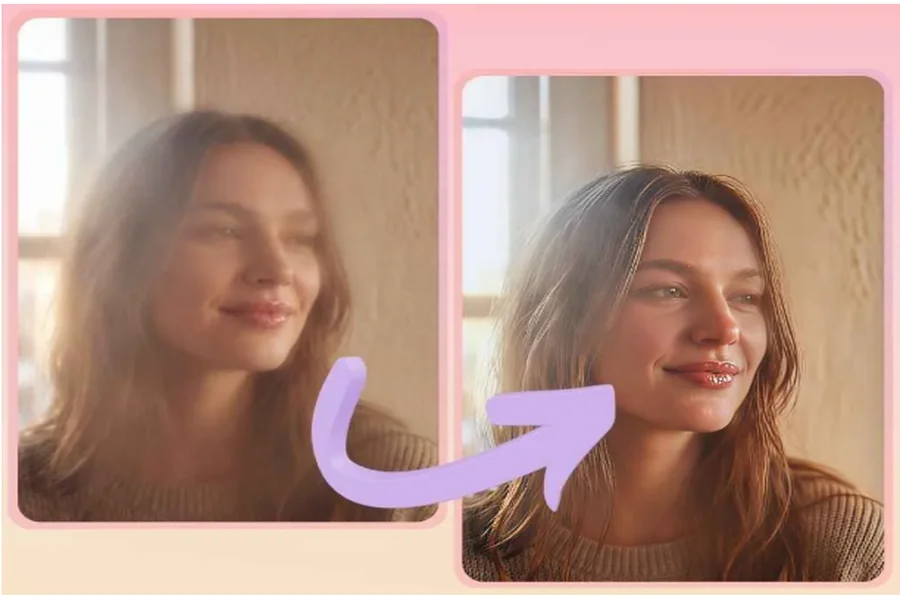
Low-resolution images look bad on modern screens. If you have an old photo or a small image from the web, you can use AI upscaling to make it bigger and sharper. The AI does not just stretch the pixels. It actually creates new pixels by guessing what the details should look like. It can turn a blurry face into a clear one and make soft edges look crisp.
Key Features
Key features include noise reduction and face restoration. Noise reduction removes the graininess that often comes with low-light photos. Face restoration is a specific type of AI that knows what human eyes, skin, and hair should look like, making portraits look much better.
Pros and Cons
The pro is that you can save old memories or use small images for large prints. It gives a second life to low quality files. The con is that if you upscale too much, the image can start to look a bit like a cartoon. The AI might add details that look slightly unnatural if the original was too blurry.
Best For
This is best for people who want to print photos from their phones or for designers who need to use small assets in large projects.
Top 7: Character Consistency
Overview
If you are telling a story, you need your characters to look the same in every picture. This has been a big challenge for AI art until recently. Character consistency tools allow you to lock in the features of a person. When you generate a new image in a different setting, the AI ensures the face, hair, and body type stay the same. This allows you to create a series of images that feel like they belong together.
Key Features
Face locking and reference images are the core features. You upload a photo of your character, and the AI uses it as a constant guide. You can also use pose matching to tell the AI exactly how the character should be standing or sitting in the new scene.
Pros and Cons
The pro is the power of visual storytelling. You can create a whole graphic novel or a brand mascot without hiring a team of illustrators. The con is that it takes some practice to master. You might need to try several times before the AI gets the face exactly right in a difficult pose.
Best For
This is best for authors making digital books and for brands that use a consistent character in their ads.
Comparison Summary
| Method | Main Strength | Best User Type |
| Style Transfer | Artistic creativity | Social media creators |
| Sketch to Image | Concept visualization | Designers and artists |
| Image Variation | Fast options | Marketing teams |
| Background Swap | Professional look | Online sellers |
| Object Removal | Image cleaning | Photographers |
| Upscaling | Quality boost | Printers and archivists |
| Consistency | Storytelling | Authors and brands |
Final Recommendation
Choosing the right tool depends on what you need to achieve. If you want to turn a simple idea into a reality, sketch to image is your best choice. If you need to clean up your professional photos, object removal and background replacement will save you the most time. AI tools are not here to replace your creativity, but to help you express it faster. You should experiment with different features to see which ones fit your workflow. Most of these tools are very easy to learn, so you can start improving your visuals today. Using an ai photo editor is the fastest way to make your work look professional. With image-to-image AI, the only limit is your imagination.